Introduction
Artifi is a powerful product personalization platform that enables customers to customize products directly within an eCommerce application. By integrating Artifi, we can add product customization experiences such as text editing, image uploads, design personalization, and real-time previews.
This integration guide outlines the steps required to embed and initialize the Artifi application within website, enabling seamless interaction between eCommerce platform and Artifi’s design engine.
Artifi provides flexible integration options to support a wide range of business and technical requirements. Depending on use case, architecture, and level of control required, you can choose from multiple integration approaches.
Below are the different ways to connect and integrate with the Artifi platform.
Integration Approaches
There are multiple ways to integrate with Artifi:
1. Layout Integration
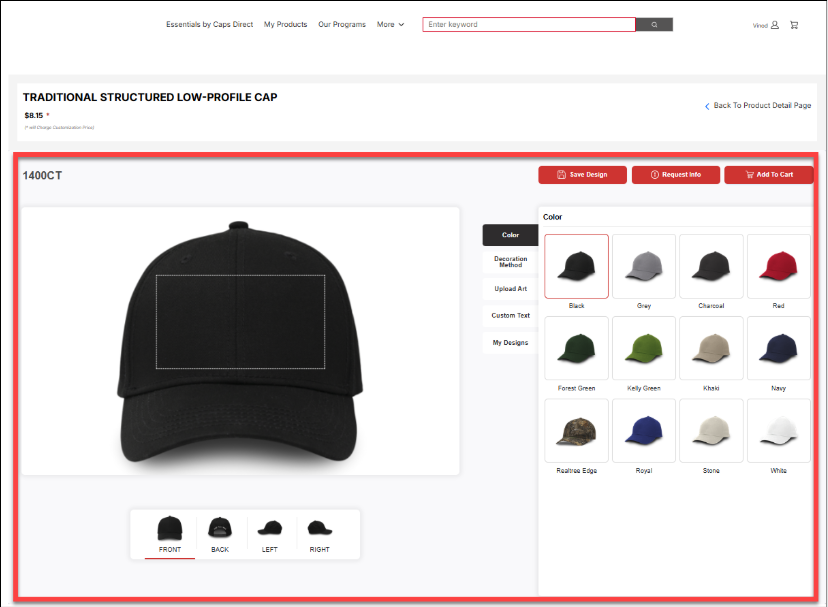
Layout Integration provides a ready-to-use, pre-built Artifi interface that can be directly embedded into your application.
- No separate UI development is required, as the complete layout and workflows are managed by Artifi
- Includes built-in capabilities for product customization, design editing, and preview
- Requires minimal effort - simply integrate and launch the Artifi Designer using the required configuration
- The eCommerce application only needs to manage integration.
Below is an example of how layout integration appears within an eCommerce application. The highlighted area represents the Artifi component integrated into the website interface.
Learn more about the layout integration process here
2. Headless Component Integration
Headless Component Integration allows to integrate Artifi as a headless solution, giving full control over the user interface while leveraging Artifi’s capabilities and components.
In this approach, Artifi does not enforce any predefined layout or interface. Instead, the eCommerce application is responsible for building and managing the complete user experience. Artifi acts as a service provider, exposing components and APIs that can be integrated into a custom-designed UI.
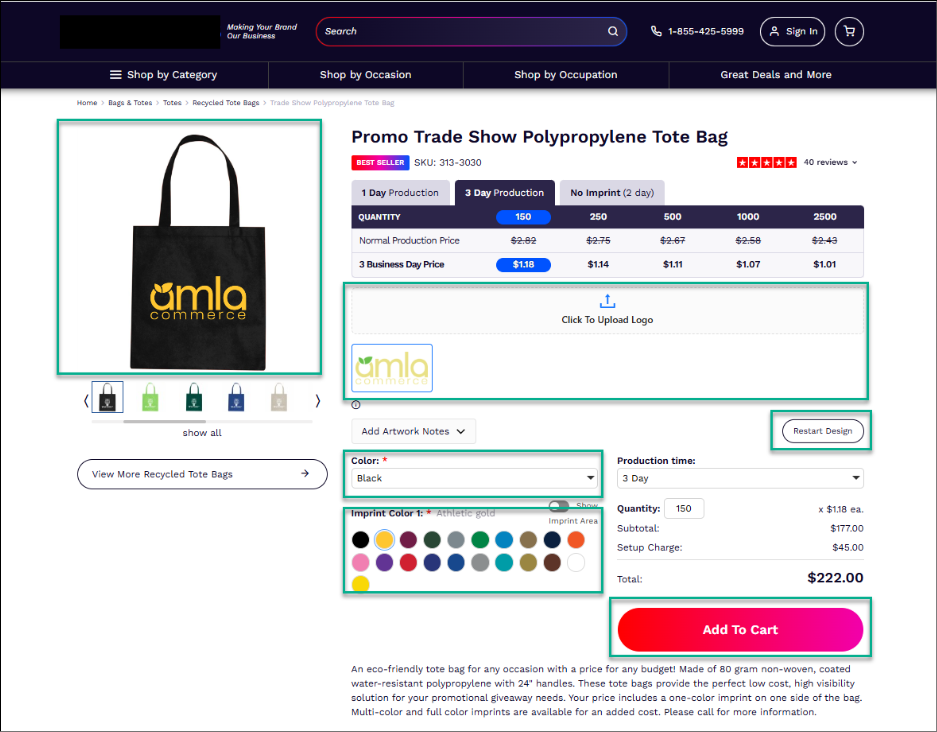 Artifi component embedded in PDP
As shown in the above image, the highlighted area represents the Artifi component integrated into the eCommerce application. These components are embedded within the existing UI to extend personalization capabilities
The entire user interface is developed and controlled by the eCommerce platform
Learn more about the headless component integration here
3. API Integration
Artifi API Integration enables eCommerce platforms to connect directly with Artifi services using REST APIs. This integration approach provides maximum flexibility and control over product personalization workflows, allowing businesses to manage data exchange, image generation, and customization processes within their own application architecture.
By configuring the required Artifi credentials and utilizing the available APIs, eCommerce platforms can generate personalized product previews, retrieve rendered images, and seamlessly integrate Artifi's customization capabilities into their existing user experience.
Learn more about the API integration here
4. Artifi Events
Overview
Artifi communicates with the Ecommerce application through events. These events allow ecommerce applications to respond to user interactions such as adding products to cart or saving designs.
Event Integration
Developers should:
- Register event listeners after initialization
- Handle incoming Artifi events appropriately
- Trigger platform-specific actions (e.g., cart updates)
Event Documentation Table
Below are the details of the events. Here is the full list of events provided by the Artifi.
Event Name | Description | Triggered When |
Add To Cart | User adds a design to cart | Add-to-cart action |
Save Design | Design is saved | Save action |
Design Loaded | Existing design is loaded | Initialization |
Product Loaded | Product is loaded | Product initialization |
Image Generated | Final image generated | Image generation done |
Sample Event Listener
window.addEventListener("message", function (event) {
const data = event.data;
if (!data || !data.eventName) return;
switch (data.eventName) {
case "Add To Cart":
console.log("Add to Cart triggered", data);
// Call your cart API here
break;
case "Save Design":
console.log("Design saved", data);
break;
case "Design Loaded":
console.log("Design loaded", data);
break;
case "Product Loaded":
console.log("Product loaded", data);
break;
case "Image Generated":
console.log("Image generated", data);
break;
}
});
6. Whitelisting Configuration
Overview
Whitelisting ensures that only approved IP addresses and domains are permitted to access Artifi services. This security measure enables a trusted and controlled integration between Artifi and external eCommerce platforms.
By restricting access to authorized sources, whitelisting helps prevent unauthorized usage and enhances the overall security of the integration.
Here is the details link of Whitelisting domain
Notes
- Whitelisting must be completed before integration
- Ensure all environments (Dev, QA, Prod) are separately configured if required
- Any change in domain or infrastructure requires updating the whitelist
6. Troubleshooting
Artifi Not Loading- Verify script URL is correct and accessible
- Check for JavaScript errors in console
- Ensure <div id="artifi"></div> exists before initialization
- Validate webApiClientKey and websiteId
- Confirm credentials with Artifi support team
Product Not Found
- Verify SKU is valid and configured in Artifi
Events Not Firing
- Confirm event listener is registered properly
- Check cross-origin restrictions (if any)
7. Best Practices
- Load scripts asynchronously, when possible, to improve performance.
- Validate all required parameters before initialization.
- Implement robust error handling and logging.
- Gracefully handle all Artifi events.
- Test both guest and authenticated user flows.
- Optimize container size for responsiveness across devices.