Overview
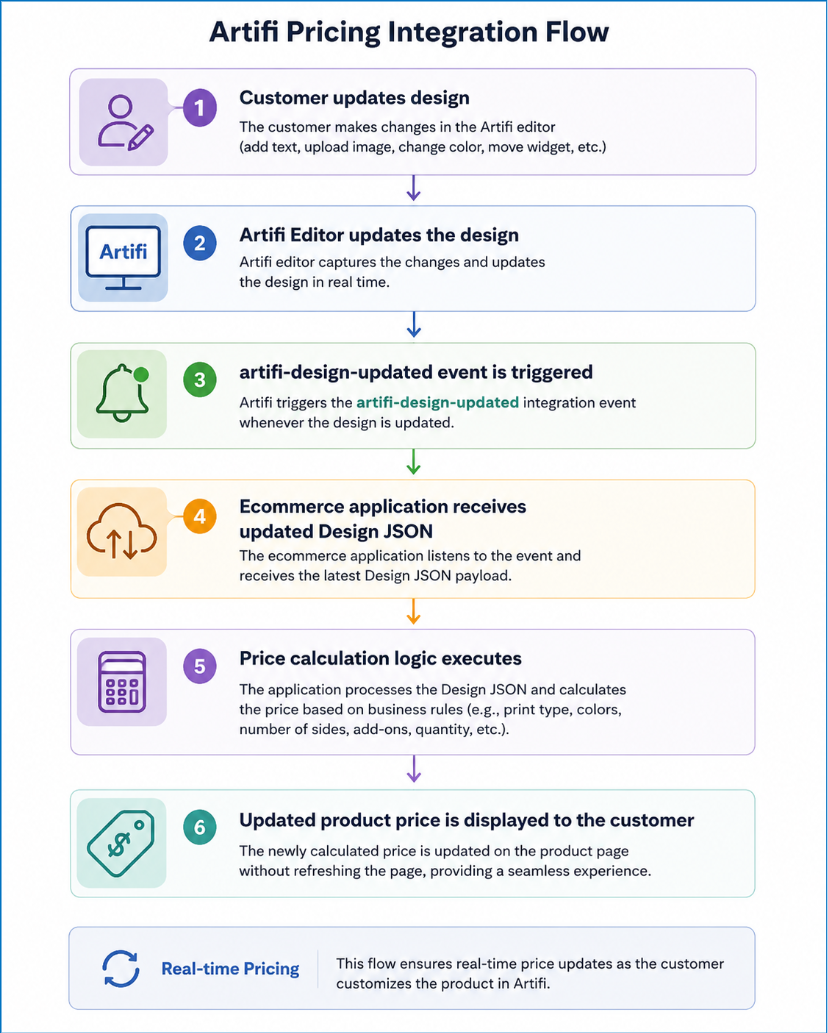
The artifi-design-updated event is triggered whenever the design is modified within the Artifi Editor. This event provides the latest state of the design in real time and is primarily intended for ecommerce applications that need to perform actions based on design changes, such as updating the product price.
Feature Availability
The Design Updated event is part of a configurable feature component and must be enabled from the Artifi Admin Portal before it can be used.
To enable this component, need to assign the price feature, follow the configuration steps provided in the corresponding Artifi documentation.
Add Component
After enabling the Artifi Pricing Trigger feature from the Artifi Admin, the ecommerce application must include the Design Updated component to receive design update details from the Artifi Editor.
Add the following HTML element to the ecommerce application's page where the Artifi editor is integrated:
<div id="artifi-design-updated"></div>
This component listens for design update events and provides the latest design details whenever the user modifies the design. These details can then be used by the ecommerce application to execute pricing calculations or any other custom business logic.
When is the Event Triggered?
The artifi-design-updated event is fired whenever a shopper performs any design modification, including (but not limited to):
- Adding a text widget
- Updating text content
- Uploading or replacing an image
- Deleting a widget
- Changing font, color, or other widget properties
- Selecting a different product attribute (such as color or size)
- Modifying decoration properties
Every design change generates an updated design payload, allowing the ecommerce application to stay synchronized with the current design.
Common Use Cases
The ecommerce application can listen for this event to:
- Update product pricing in real time
- Calculate decoration charges
- Apply personalization fees
- Display updated pricing to the shopper
- Perform custom validation
- Trigger external APIs
Update Pricing
The most common use case for this event is real-time price calculation.
Whenever the design changes, the ecommerce application should:
1. Listen for the artifi-design-updated event.
2. Read the updated design JSON returned by the event.
3. Calculate the product price based on the current design configuration (for example, number of colors, decoration method, text count, uploaded images, embroidery settings, etc.).
4. Update the product price displayed on the Product Detail Page (PDP) without requiring the shopper to refresh the page.
This provides an accurate and responsive pricing experience while the customer customizes the product.
Event Name
artifi-design-updated
Event Listener
window.addEventListener("artifi-design-updated", function (e) {
// Your custom logic goes here
});
The event returns the latest design information in JSON format.
The JSON includes information such as:
{
"data": {
"sku": "DIARY-MRN",
"productAttribute": [
{
"name": "Diary Attribute",
"code": "Diary Attribute",
"displayName": "Color",
"selectedValue": {
"value": "Maroon",
"valueCode": "Maroon",
"keyValue": "#663e3e"
}
}
],
"colorAttribute": [],
"decorationMethodCode": "Default",
"views":
{
"viewCode": "102506",
"text": [
{
"widgetKey": "",
"id": "text_1",
"text": "Sample text",
"fontFamily": "Arimo",
"fontSize": "50",
"fontCode": "ACDF002",
"color": "#bd343b",
"fontWeight": "normal",
"fontStyle": "normal",
"textAlign": "center",
"noOfTextLines": 1
}
],
"image": [
{
"widgetKey": "",
"clipartId": 49907,
"clipartCode": "",
"photoId": null,
"color": "",
"id": "image_1",
"selectedColors": []
}
]
},
{
"viewCode": "102507",
"text": [],
"image": []
}
]
},
"action": "artifi-design-updated"
}
Integration Recommendation
- Register an event listener for artifi-design-updated immediately after initializing the Artifi Editor.
- Treat each event as the latest version of the design rather than comparing it with previous events.
- Use the returned Design JSON as the source of truth for pricing and other business logic.