Navigate to: Merchandise > Website > Edit Website
1. Overview
This article explains how to configure IP and Domain Whitelisting in Artifi Admin. Whitelisting ensures that only approved IP addresses, domains, or IP ranges can access Artifi services, enabling secure integration between Artifi and external e-commerce platforms.
2. When Should You Use Whitelisting?
Whitelisting should be configured in the following scenarios:
- Allowing specific domains to access the Artifi designer or APIs
- Restricting access to only approved IP addresses for security purposes
- Configuring integrations between Artifi and e-commerce platforms
- Updating access when there is a change in IPs, domains, or hosting environments
4. Prerequisites
Before configuring whitelisting, ensure that:
- You have Admin access in Artifi
- You have the required Domain, IP Address, or IP Range details
- You are aware of any integration URLs (e.g., pricing APIs)
6. Steps to Whitelist IPs and Domains
Use the following steps to whitelist a Domain or IP:
- Hover over Merchandise and click on the Websites menu.

- Click on the Website Name to edit.

- The Website configuration screen will appear. Click on the Add (yellow button)
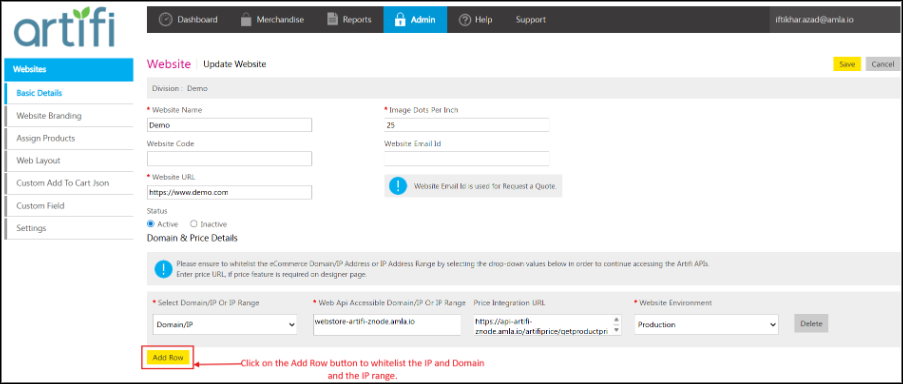
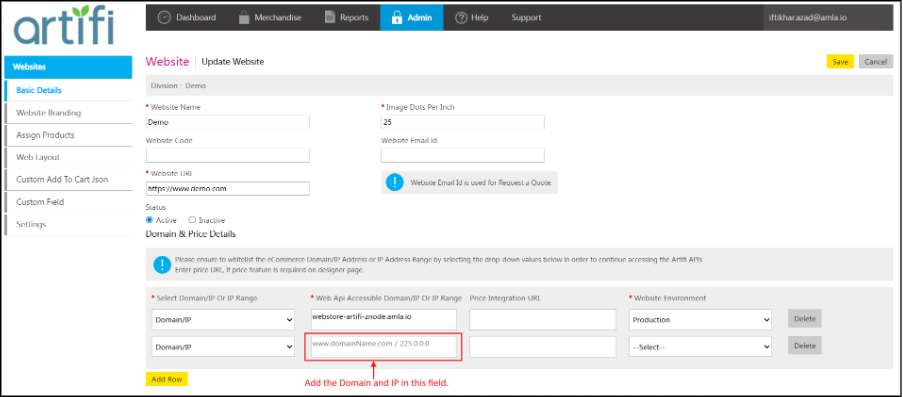
- A new row will be added. Add the Domain or IP in the next field.
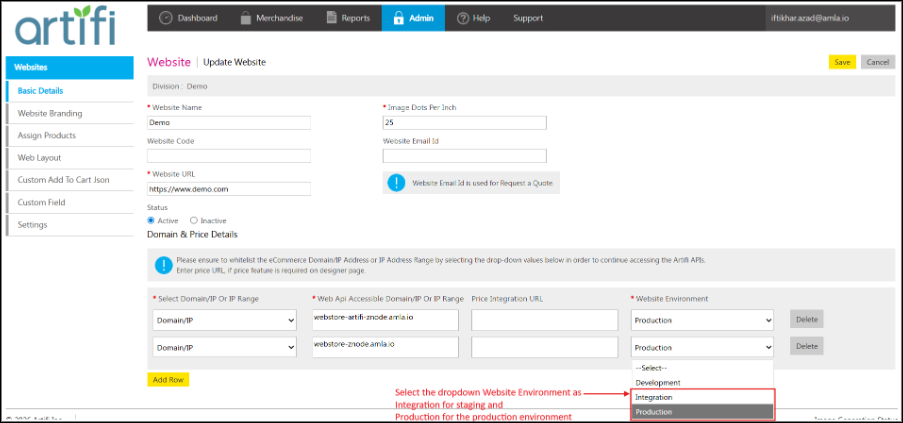
- After adding the Domain and IP select the Website Environment
- Click on the Save button from top right corner of the page.
- After saving, the added IPs or domains will be allowed to access Artifi from the configured website.
9. Next Step
After configuring whitelisting:
- Validate the integration from the configured domain or IP
- Ensure APIs and designer are accessible from the allowed sources
10. Common Issues & Troubleshooting
Issue: 
Possible Cause: Domain/IP is not whitelisted
Resolution: Verify that the correct Domain or IP is added and saved
Issue: 
Possible Cause: IP or Domain changed
Resolution: Update the new IP/Domain in the whitelist and save
11. Best Practices & Recommendations
- Always keep whitelist entries updated after infrastructure changes
- Avoid adding unnecessary or unknown domains for security reasons
- Maintain a record of all whitelisted entries for audit purposes
- Periodically review and remove unused or obsolete entries
12. Related Articles
13. Q&A
What is whitelisting?
A: Whitelisting is the process of allowing only specific IPs, domains, or ranges to access a system.
Why is whitelisting required in Artifi?
A: It ensures secure access and restricts unauthorized integrations with Artifi.
Can I whitelist multiple domains or IPs?
A: Yes, multiple entries can be added using the Add button.
What happens if IPs change on the e-commerce side?
A: The updated IPs must be added in Artifi Admin to maintain access.
Can IP ranges be used instead of individual IPs?
A: Yes, IP ranges are recommended for managing multiple IPs efficiently.
Where can whitelisted, entries be configured?
A: Navigate to Merchandise > Website, edit the website, and add entries in the whitelist section.