Navigate to: Login Page
1. Overview
This article provides information on how users can log in to the application using valid credentials.
2. When Should You Log In?
Users should log in when they need to:
- Access the application for daily merchandise operations
- Work in Sandbox or Production environments
- Manage or update account-related activities
- Resume work after being logged out
3. Prerequisites
Before logging in, ensure that:
- A valid user account has been created in the Artifi Admin portal
- You have your registered email address and password
- You know whether access is required for the Sandbox or Production environment
4. Steps to Log In
Follow the steps below to log in to the system:
1. Open the appropriate login URL in a browser:
- Sandbox Environment: https://integrationadmin.artifi.net
- Production Environment: https://admin.artifi.net
2. The Login Page will appear. 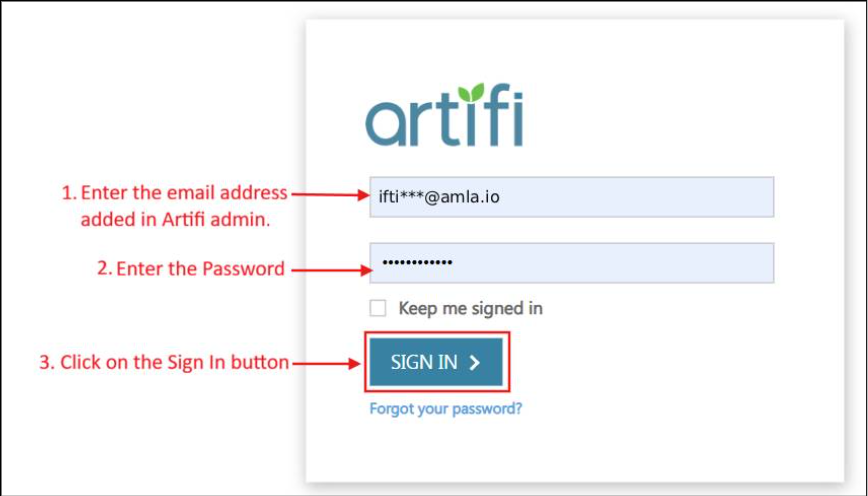
3. Enter your registered email address in the Email field.
4. Enter your password in the Password field.
5. Click the Login button.
6. If the credentials are correct, you will be successfully logged into the system and redirected to the dashboard page.
5. Next Step
After successful login, users can access available modules and perform required operations based on their assigned role and permissions.
6. Common Issues & Troubleshooting
Issue: Invalid Credentials Error
Possible Causes:
- Incorrect email or password entered
- Caps Lock enabled while entering password
Resolution:
- Re-enter credentials carefully
- Ensure correct case sensitivity for password
Issue: Unable to Access Login Page
Possible Causes:
- Incorrect URL entered
- Network connectivity issues
Resolution:
- Verify the correct environment URL
- Check internet connection and retry
Issue: User Does not exist.
Possible Causes:
- User account not created in the system
- Incorrect registered email used
Resolution:
- Verify the registered email address
- Contact administrator to confirm account creation
7. Best Practices & Recommendations
- Always use correct environment URL (Sandbox or Production)
- Keep login credentials confidential
- Log out after completing your session
- Update passwords periodically for security
8. Related Articles
9. Q&A
Q: What should I do if I enter incorrect credentials?
A: Recheck your email and password and try again. Ensure Caps Lock is off.
Q: Can I use the same login for Sandbox and Production?
A: Yes, if your account has been enabled for both environments. The URL for the both the environment is different. Use https://integrationadmin.artifi.net for sandbox environment and https://admin.artifi.net for production.
Q: What should I do if I cannot access the login page?
A: Verify the URL and check your internet connection.
Q: What happens after a successful login?
A: You will be redirected to the dashboard where you can access system modules.